
Stop searching for the same chords every time.
- No more digging through ads and five versions for the one you played last time.
- No more one app per chord site, and none for the songs in your language.
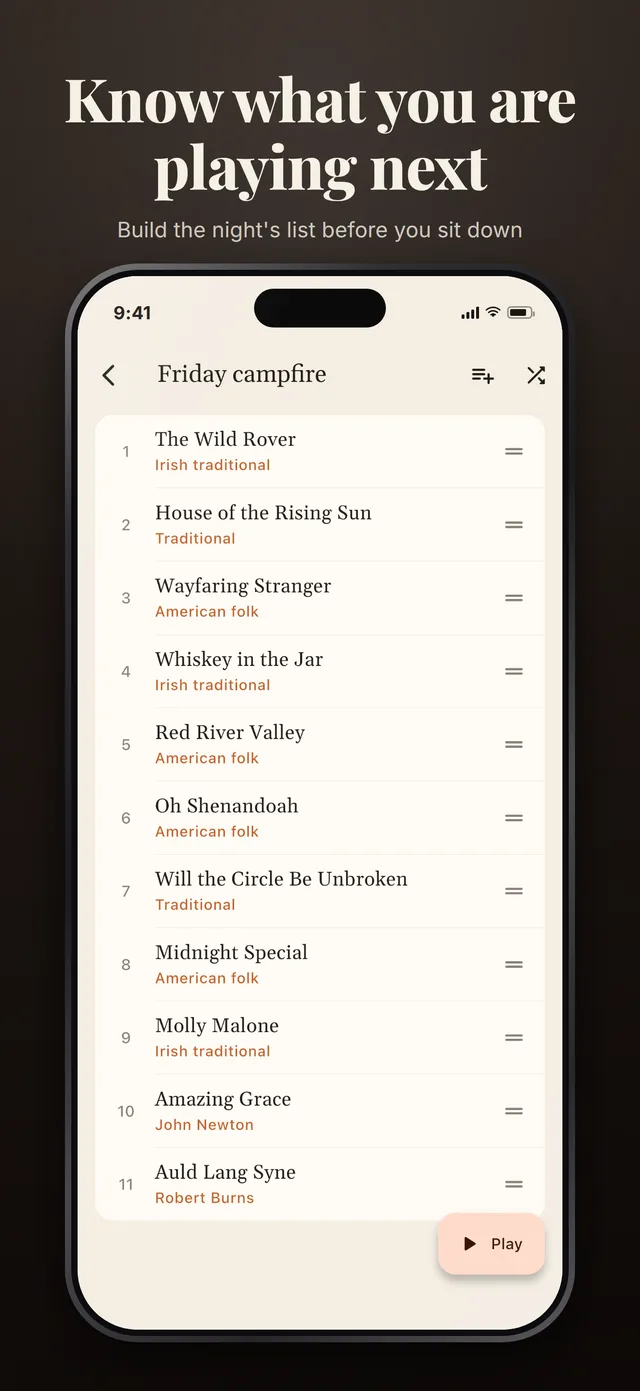
- No more blank stare when someone asks “what should we play?”
Campfire Chords keeps the songs you know on your phone, with their chords from any website, ready to play — even with no signal.
Free to start · no account · works with no signal
One songbook
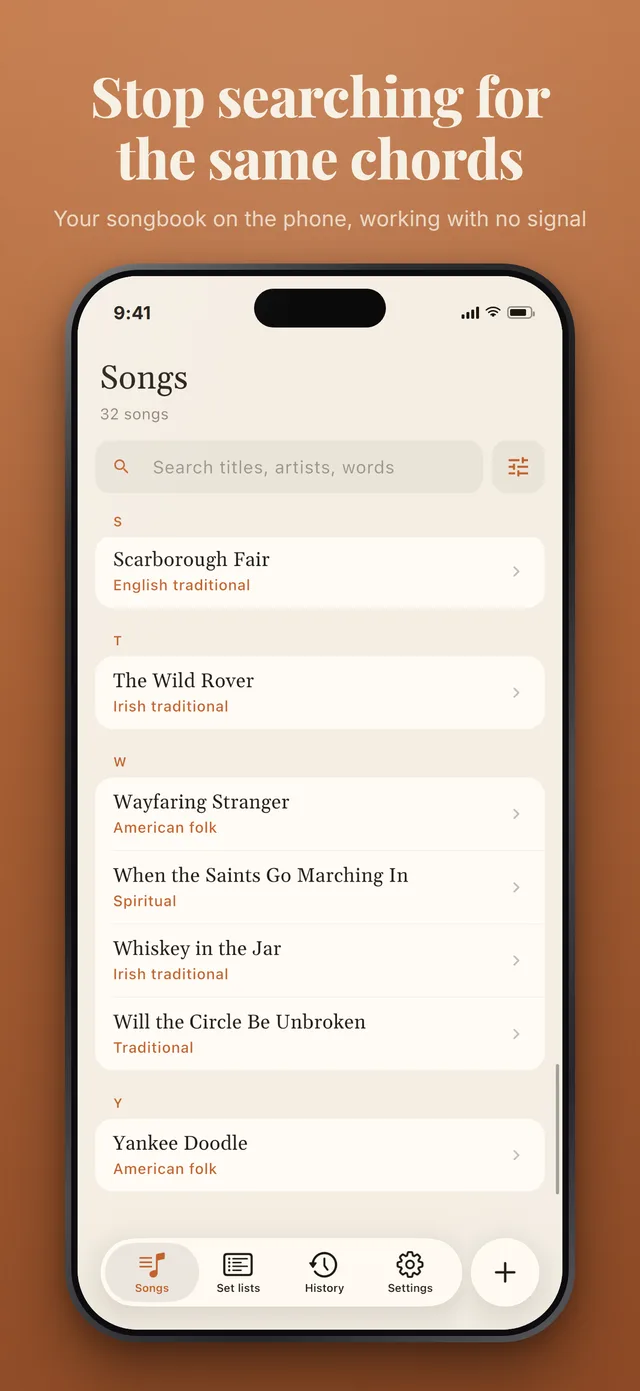
Every source, every language, one list
The songs people actually play come from everywhere. Your songbook should too.
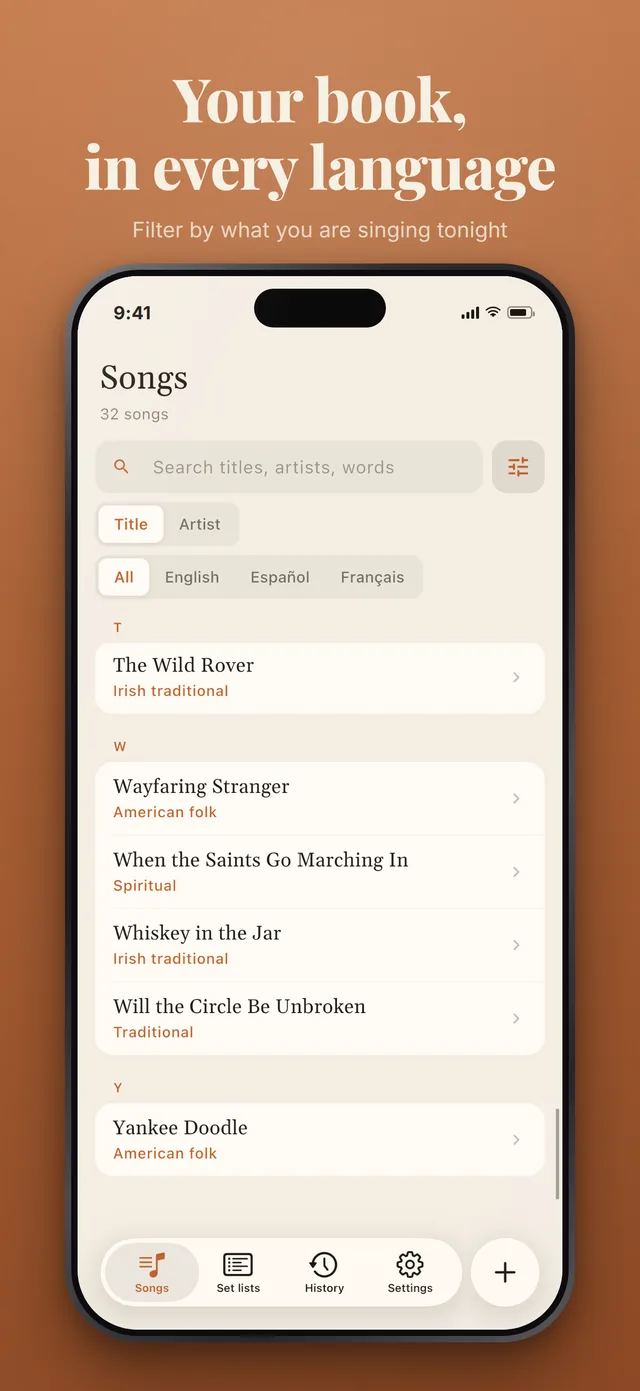
Chord apps that keep a library usually keep it from one site's catalogue, in one language. The songs people actually play around a fire come from everywhere: an old favourite in English, a song from home in Spanish or French, the one a friend taught you.
This app keeps your own list instead. Any site, any language, one songbook — and once a song is in it, it is on your phone. It opens with no signal, which is the usual state of affairs at a campfire.
Amazing Grace Traditional
- GAmazing G7grace, how Csweet the Gsound
- That Gsaved a wretch like Dme
- Saved
- on this phone
- Transpose
- remembered per song
- Played
- 3 times this month
Thirty seconds
Chords from any page, in four taps
You pick the page. The app copies what is on it into a clean chord sheet, and adds nothing of its own.
-
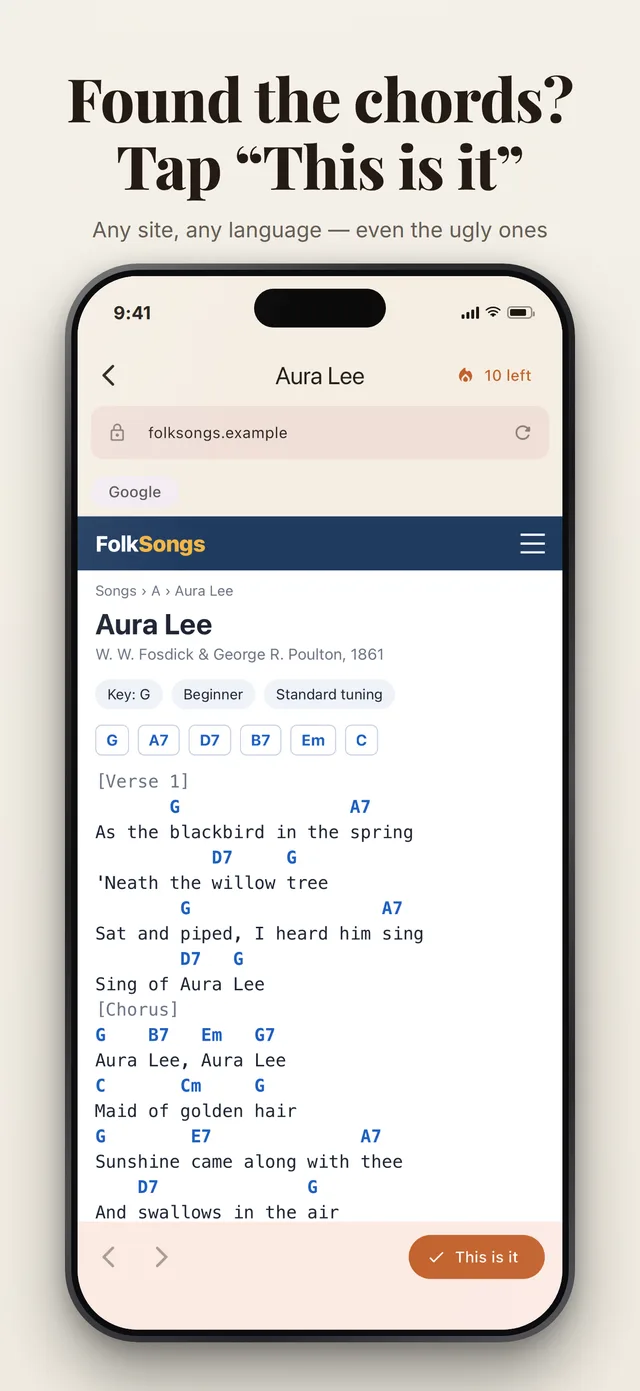
Search for the song
Type the song and the artist. The app opens its own browser on a web search for its chords, with the address bar and back button of an ordinary browser.
-
Pick the page you trust
Open any result, on any site, in any language. The page loads on your phone like any other visit. You choose the version; the app never picks one for you.
-
Tap "This is it"
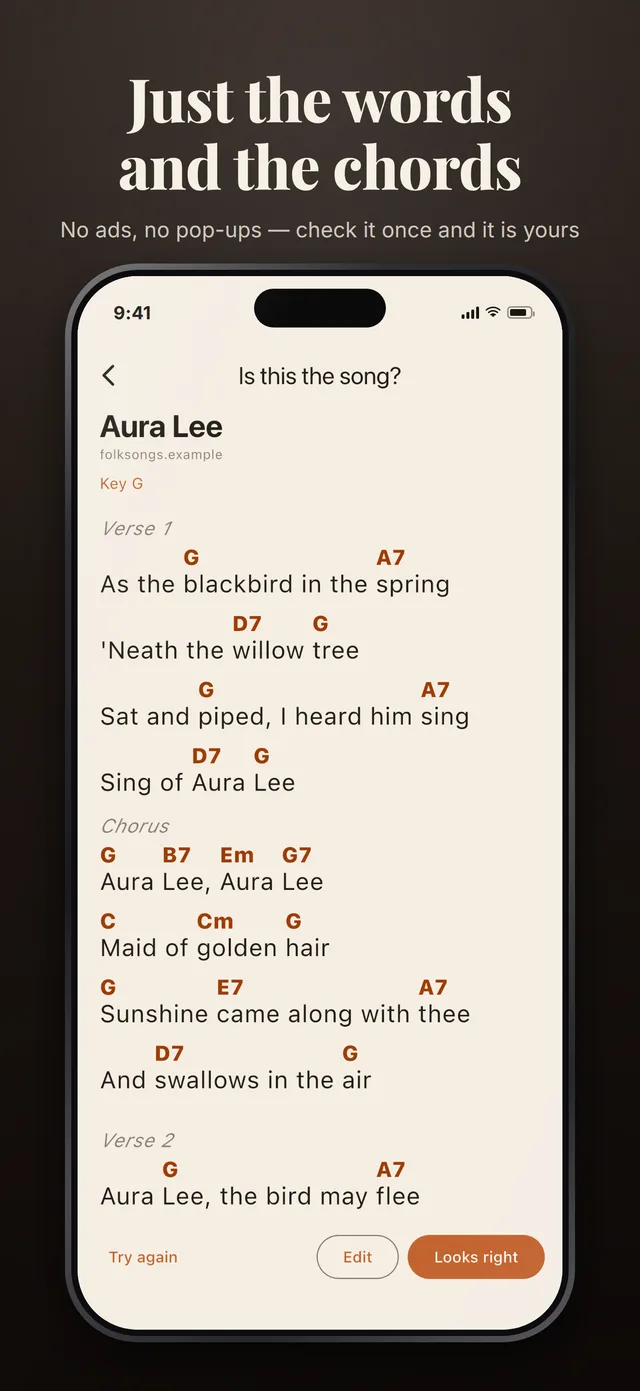
The text of that page is cleaned up into a chord sheet: ads, comments and menus dropped, chords placed over the words they sat above. Nothing is added that was not on the page.
-
Check it, and it is yours
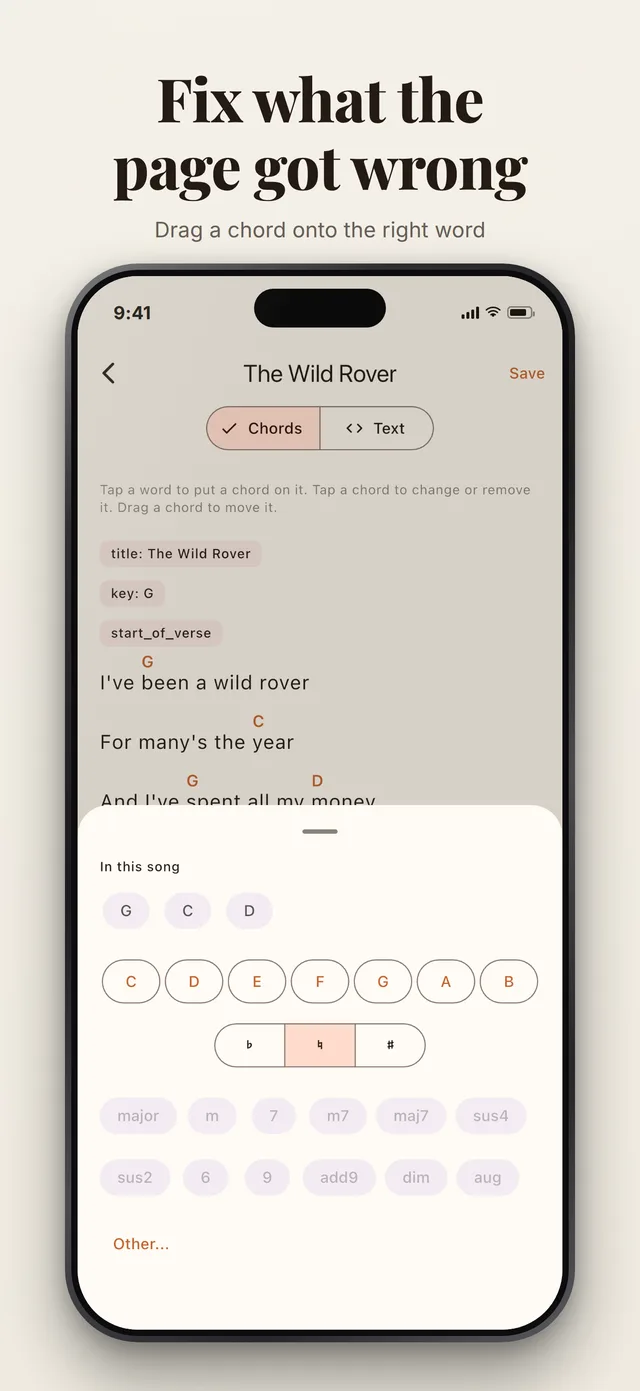
The result opens the way it will play. "Looks right" saves it on your phone for good; "Try again" goes back to the browser; "Edit" lets you fix a chord first.
Playing
Readable at arm’s length, by firelight
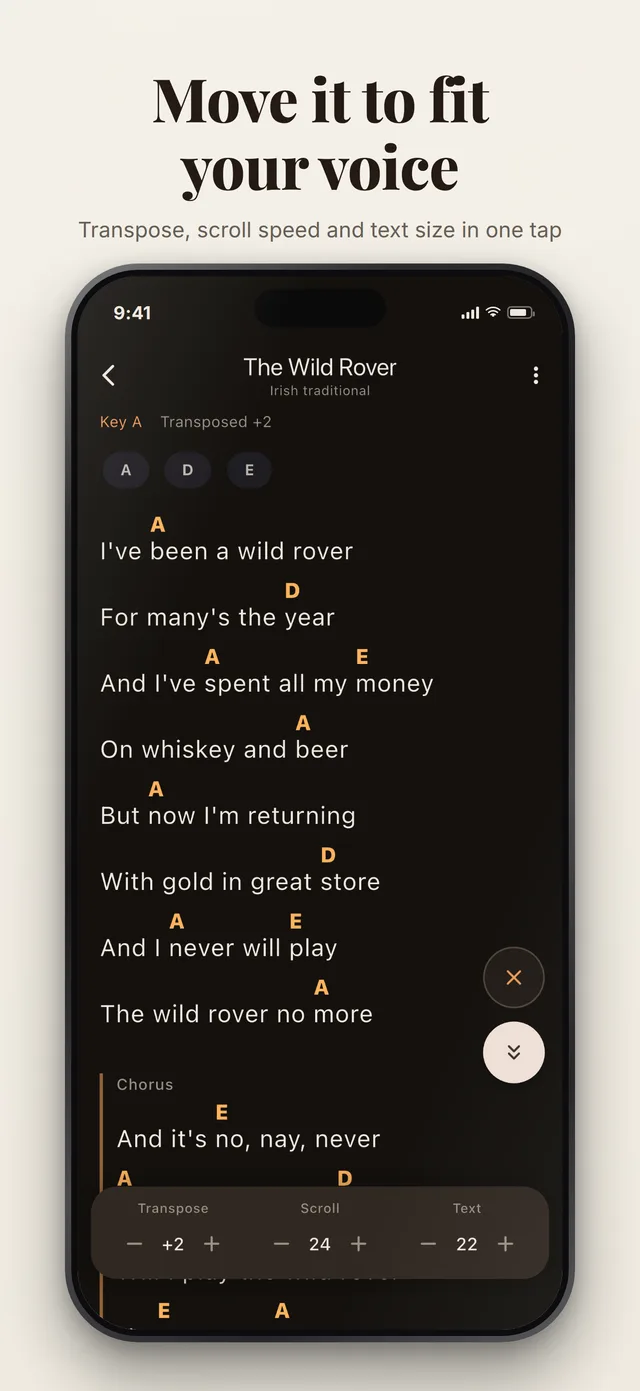
The play view follows your phone, dark at night and light by day, with large text and the chords in a warm colour that stays legible in both.
-
Transpose
Move the whole song up or down a semitone at a time to fit your voice. Sharps or flats follow the new key, and the song remembers where you left it.
-
Auto-scroll
The sheet scrolls at your speed while both hands are on the guitar. The speed is saved per song.
-
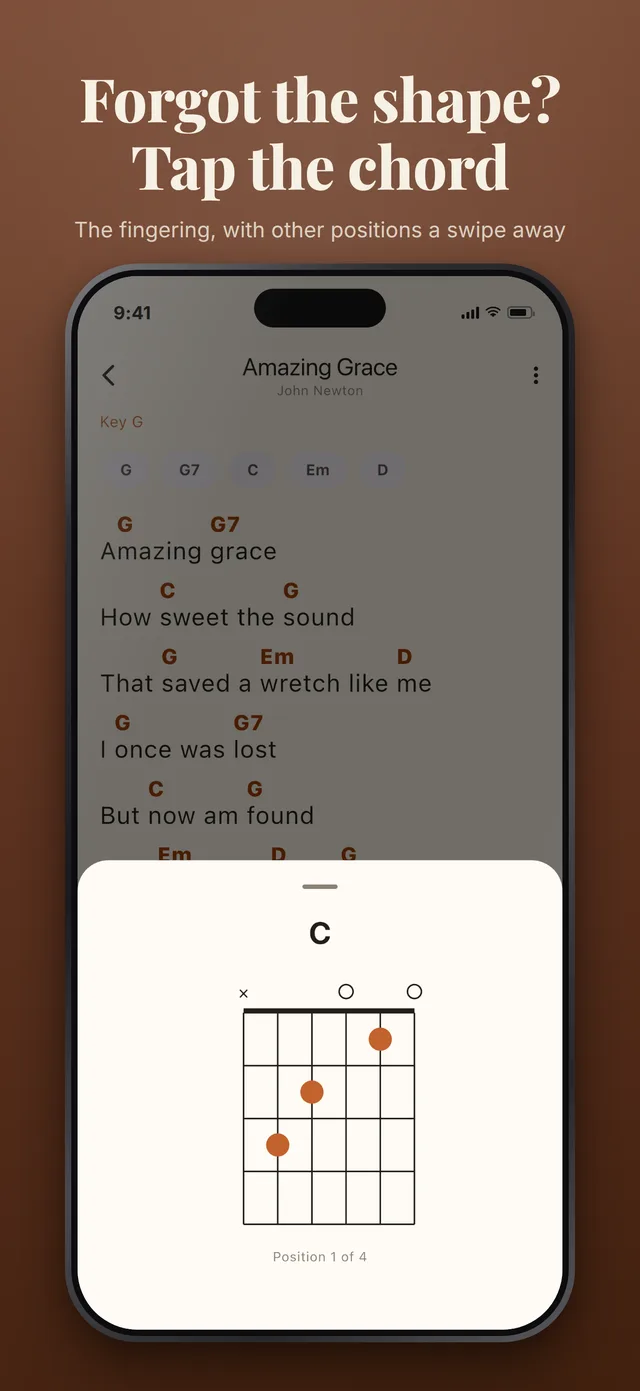
Tap a chord
Any chord opens its guitar fingering, with other positions a swipe away. Every chord in the song is listed once at the top, so you can check the unfamiliar ones first.
-
Screen stays on
The phone does not dim in the middle of a verse. Text size is a stepper or a pinch, and lyrics-only hides the chords for singers.
Any language
Right to left, with the chords in the right place
A right-to-left song reads right to left, and its chords still sit over the syllable they belong to.
Most chord sheets are laid out with spaces, which only works in a monospaced font and falls apart the moment the text runs right to left. This app places each chord on the word it belongs to instead, so a line can wrap on a small screen without a chord drifting onto the wrong syllable, whichever way the line runs.
If a page names its chords Do, Re, Mi, as many Spanish and Latin American sites do, the app says so and lets you switch between solfège and letter names from the play view.
Cielito Lindo Mexican traditional
- CAy, ay, ay, G7ay, canta y no Cllores
- Porque cantando se aFlegran
- Chords
- on the word they belong to
- Names
- letters or Do, Re, Mi
Privacy
Your songbook, on your phone
No account to make and nothing to log in to. Your songs, set lists and history are kept on the phone and nowhere else.
-
Local by default
The library, set lists, history and the play view all work with no signal at all. Only finding new chords needs the internet.
-
One thing is sent, when you ask
Tap "This is it" and the text of that one page goes to be cleaned up. It is not stored, and the result comes back to your phone.
-
No account, no advertising
An anonymous Firebase identity, made the first time the app starts, counts your free imports. It is not your name, your email or anything about you.
Answers
Questions guitar players ask, answered properly
-
How do you keep all your guitar chords in one place?
Keep one list of the songs you actually play, with each song's chords saved as text on your phone rather than bookmarked.
-
How do you save chords from a website to use offline?
Save the text of the chord sheet, not the page.
-
How do you transpose chords to fit your voice?
Move every chord up or down by the same number of semitones until the highest line of the song sits where you can sing it without straining.
Questions
Do I need an account?
No. There is nothing to sign up for and nothing to log in to. The app gives itself an anonymous identity the first time it starts, so that free imports can be counted, and that identity is not your name, your email or anything about you.
Does it work without a signal?
Everything except finding new chords. The library, search, set lists, history, chord diagrams and the play view all run on the phone. Importing a page needs the internet, and the app says so plainly when there is none.
Which websites can I get chords from?
Any page with a chord sheet on it, in any language. The app opens a real browser on a search for your song, you pick the page with the version you like, and tap This is it. If a page is too cluttered to read whole, select just the song on it and try again.
Does the AI write the chords?
No. A language model rewrites the page you picked into a clean chord sheet, and it is told to use only what is on the page. Then every lyric line is checked against the page, and any line that is not there is taken out before you see the result. The chords and words are the ones the page had.
Does it support right-to-left songs?
Yes. Each line reads its direction from its own words, so a right-to-left line runs right to left with every chord over the syllable it belongs to, and chord names like G/B stay readable inside it.
What does it cost?
The app is free, with no advertising, and a free install includes 10 chord imports. Pro is a one-time purchase with no subscription: import as many songs as you need, within fair-use limits. Everything else in the app is the same with or without it.
Start with the ten songs you always play
Ten chord imports are free. That is enough to see whether it earns a place on your phone before the next campfire.
Free to start. No account, no advertising, and nothing to sign up for.